
How Verification Works on Hamuwemu: Phone, Selfie and NIC
Fake profiles are the biggest worry on any dating app. Here's exactly how Hamuwemu checks people, what happens to your selfie and NIC afterwards, and what verification can't do.

How Verification Works on Hamuwemu: Phone, Selfie and NIC
Fake profiles are the biggest worry on any dating app. Here's exactly how Hamuwemu checks people, what happens to your selfie and NIC afterwards, and what verification can't do.
Short answerevery Hamuwemu account confirms a mobile number with a one-time code. Before you can send your first message, you take a selfie in the app, and a trained member of our team checks that you're a real person and that your photos are of you. Every profile photo is checked by a person before it appears. NIC verification is optional and adds an extra badge.
Fake profiles are the biggest worry on any dating app, and for good reason. Sri Lanka Police list romance scams run through fake profiles among the most common online frauds in the country.
That's why Hamuwemu checks people in layers, from the moment they sign up to every conversation they have. Here's how each check works, what happens to your selfie and NIC afterwards, and what verification can and can't do.
The five layers of verification

1. Sign-up checks, for every account
You confirm your mobile number with a 6-digit SMS code and your email with an 8-digit code.
An automatic human-check also runs at sign-up, so scripts can't create accounts in bulk.
Automated sign-ups are the main source of fake and scam accounts, so this matters more
than it sounds.
Hamuwemu is for adults only. Sign-up is blocked for anyone who enters a date of birth under
18, and your date of birth is locked once your account is created. New here? Follow our
step-by-step registration guide.
2. A selfie reviewed by a person, before your first message
You can sign up and browse straight away. Before you send your first message, you take a
selfie in the app, and a trained member of our team checks that you're a real person and that
your profile photos are of you.
No software makes this call. We don't run face recognition on your selfie and we don't create a
face template, so your selfie is treated as a photo, not biometric data. If that ever changes,
we'll tell you first and ask for your consent. Your selfie is never shown on your profile.
3. Every profile photo reviewed
A trained person checks each profile photo before other members can see it. If a rejected
photo is uploaded again, it's recognised and sent back for review. Automated checks also look
at profile text for things that break our rules, such as phone numbers and known scam
phrases.
4. The NIC badge, if you want it
For an extra verification badge, you can upload the front and back of your NIC during sign-up,
or tap Skip for now. It's genuinely optional: you can match and message without it.
5. Reports and human decisions, always on
You can report a profile, or long-press a single message to report it. Chats are end-to-end
encrypted, so we can't read them. When you report a message, your phone sends us a copy of
what you saw, and we check that the reported member really sent it.
Suspensions and bans are decided by a person, not a machine, and you can [appeal to a
human reviewer](https://hamuwemu.lk/legal/community-guidelines#appeals).
What happens to your selfie and NIC

- Who sees your selfie. Only a small, named group of trained staff, for the review.
- How long it's kept. Your selfie is deleted 30 days after the verification decision. We keep only
the outcome and the date. - Your NIC images. Deleted 30 days after the decision too, unless they're needed for a fraud
investigation or a legal claim. - How it's protected. Everything travels encrypted between the app and our servers, and
stored data is encrypted too.
The full details are in our Privacy Policy.
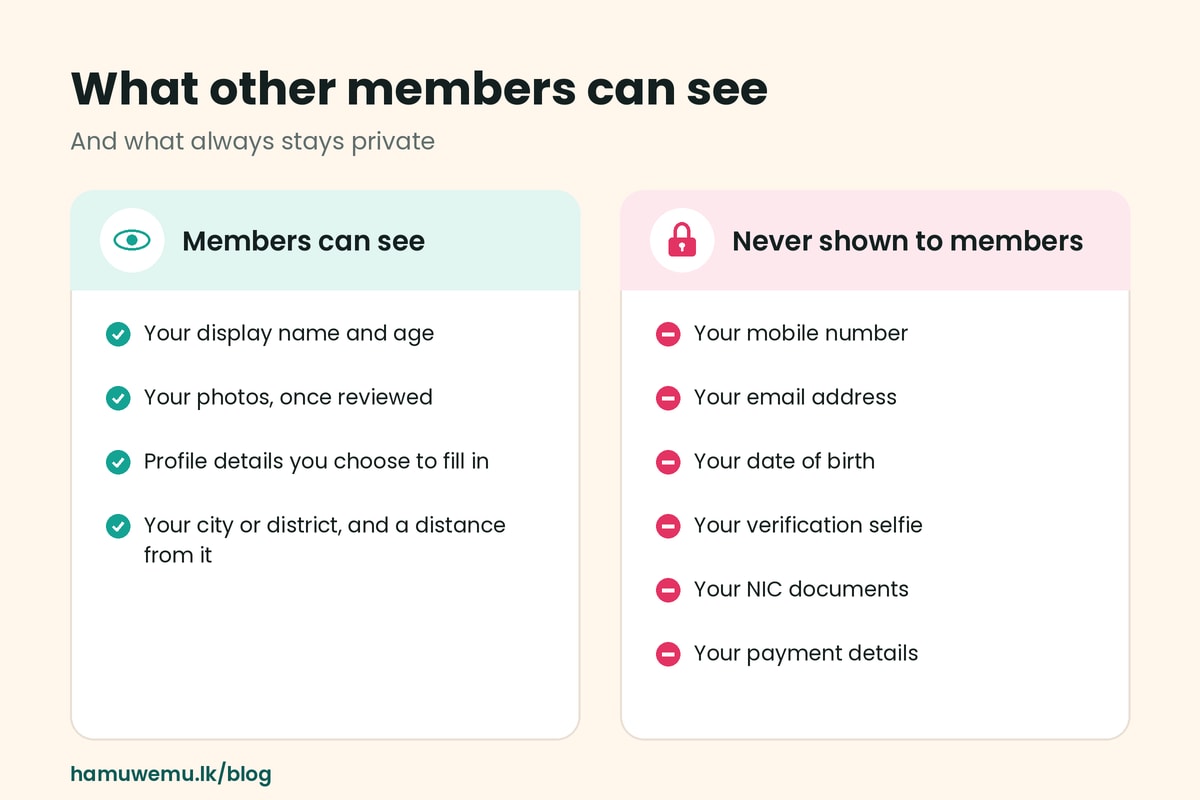
What other members can see
Members see your display name, age, photos and the profile details you choose to fill in, plus
your city or district and a distance from it. Your mobile number, email address, date of birth
and payment details are never shown, and neither is your verification selfie or your NIC.
Hamuwemu doesn't collect your GPS location. Distances are worked out from the city or
district each member chooses.
Tips for a smooth selfie review
Your reviewer is checking that you match your profile photos, so make that easy:
- Use good light, ideally facing a window.
- Keep your whole face visible: no sunglasses, mask or heavy filters.
- Make sure your profile photos are recent and clearly show your face. Our [dating profile
guide](https://hamuwemu.lk/blog/how-to-create-a-dating-profile-that-gets-more-genuine-matches) has more photo tips. - Take the selfie in the app when it asks you.
What verification can't do
Verification tells you someone is a real person who looks like their photos. It can't tell you what
they intend. Keep the habits that protect you:
- Video-call before you meet. Two minutes on camera settles most doubts.
- Meet in a busy public place. Our safety guide covers the details.
- Keep your phone number private until you've met. Here's when it is safe to share it.
- Keep money out of it. Any request for money, gifts or “fees” ends the conversation.
- Report anything that feels wrong. Reports go straight to our safety team.

Frequently asked questions
Is Hamuwemu safe?
No app can promise perfect safety. What Hamuwemu does is confirm every account's mobile
number, have a person review each member's selfie before they can message, and review
every profile photo before it appears. Your own habits do the rest.
Do I have to give my NIC?
No. It's optional and adds an extra verification badge. You can match and message without it.
Who can see my selfie?
Only a small, named group of trained staff, for the review. It never appears on your profile, and
it's deleted 30 days after the decision.
Does Hamuwemu use face recognition?
No. A person reviews your selfie. We don't run face recognition or create a face template, and
if that ever changes you'll be told first and asked for your consent.
Why can't I send messages yet?
Your selfie has to be approved before you can send your first message. You can still browse
and finish your profile in the meantime.
Meet people who've been checked by a person, not just a computer. Join Hamuwemu and see the
difference.
Join Hamuwemu · Start as Friends. Find Your Forever.


